What makes it different
There are already plenty of EQs. This one differs in three ways.
① It doesn't just imitate the harmonics
Half of «that EQ sound» is harmonics, but the other half is how the filter behaves. Match only the harmonics and you get a «digital EQ with color». That's why each model has its own proportional Q, cut asymmetry and shelf opposite-side dip — boost the same +12 dB and the width of the curve can differ by up to five times.
② An EQ shouldn't move on its own
A compressor's threshold has to change over time, but if an EQ curve moves by itself, you can't recreate the sound you just heard. So the only thing that moves on its own is giving back the loudness the boost took. The curve is always decided by a person who can see it — even when the AI proposes one, it's drawn on screen first.
③ You can see why that curve
The AI style rules are not learned weights — they are written as plain text in the code. An EQ that can't explain why it cut 3 kHz by 2 dB is no use in a mix. The curve window draws the filter that is actually running, not an approximation made for the picture — keep them separate and they'll drift apart someday, and from then on that window starts lying to you.
7 models — «filter behaviors»
They are named by circuit type (topology), not by hardware names. Those names are still living trademarks, and independently implementing a measured circuit behavior is a different matter from putting someone else's trademark on a product.
| Model | Where it differs | THD, 1 kHz @ −6 dBFS |
|---|---|---|
| CLEAN | Textbook constant Q · no color — modeling «switched off». The reference point for comparison | 0.000 % |
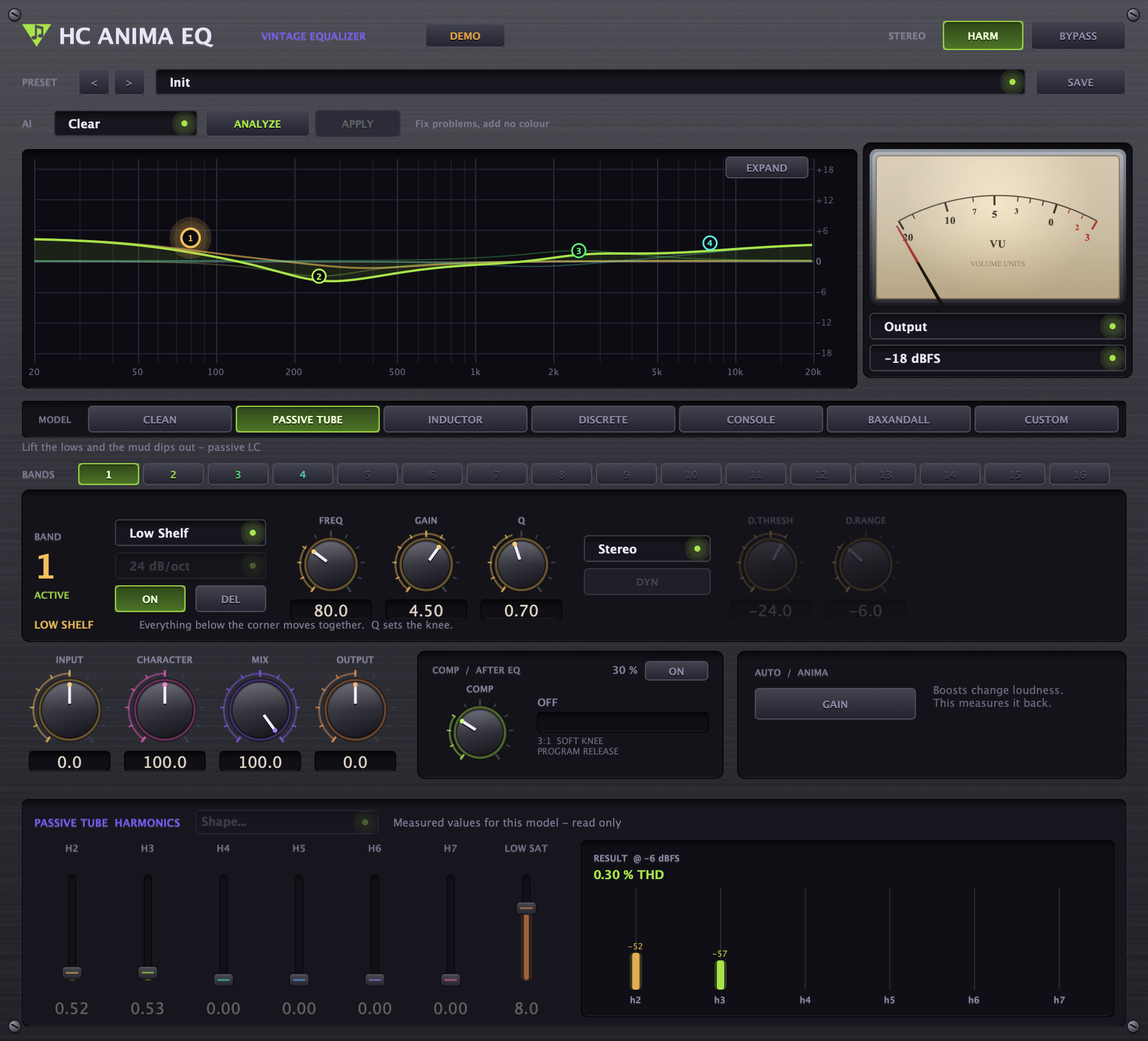
| PASSIVE TUBE | Shelf opposite-side dip 0.35 — boost the lows and the area just «above» them dips slightly. The behavior where the more you boost, the more the muddiness drops out | 1.650 % |
| INDUCTOR | Cuts are narrower than boosts (1.25×) — carves out only the problem and leaves its surroundings alone | 1.031 % |
| DISCRETE | Proportional Q — the more you boost, the narrower it gets by itself. A small boost stays wide and gentle | 0.601 % |
| CONSOLE | Constant Q · surgical. Moves only what you boosted, right where you boosted it | 0.199 % |
| BAXANDALL | Deliberately can't cut narrow (qScale 0.50) — for changing the «overall color» with a wide width | 0.510 % |
| CUSTOM | Reads the harmonics from the knobs instead of a table — you draw orders 2 through 7 by hand | from the knobs |
Measurements, not talk
HIGH MID boosted by the same +12 dB @ 2.5 kHz, with the Q knob set to 1.0 on all three, then actually measured. The numbers match, yet what the neighboring frequencies receive differs this much.
| Model | 1 kHz | 1.5 kHz | 2.5 kHz | 4 kHz | 6 kHz |
|---|---|---|---|---|---|
| CONSOLE | +2.55 | +5.66 | +12.00 | +6.12 | +2.75 |
| DISCRETE | +1.14 | +3.22 | +12.00 | +3.60 | +1.25 |
| BAXANDALL | +5.74 | +9.01 | +12.00 | +9.35 | +6.02 |
At 1 kHz, +1.14 versus +5.74 — the same «+12 dB», yet the neighboring band receives five times as much. That's where it's decided whether, when you boost a vocal at 2.5 kHz, the body at 1 kHz comes up with it.
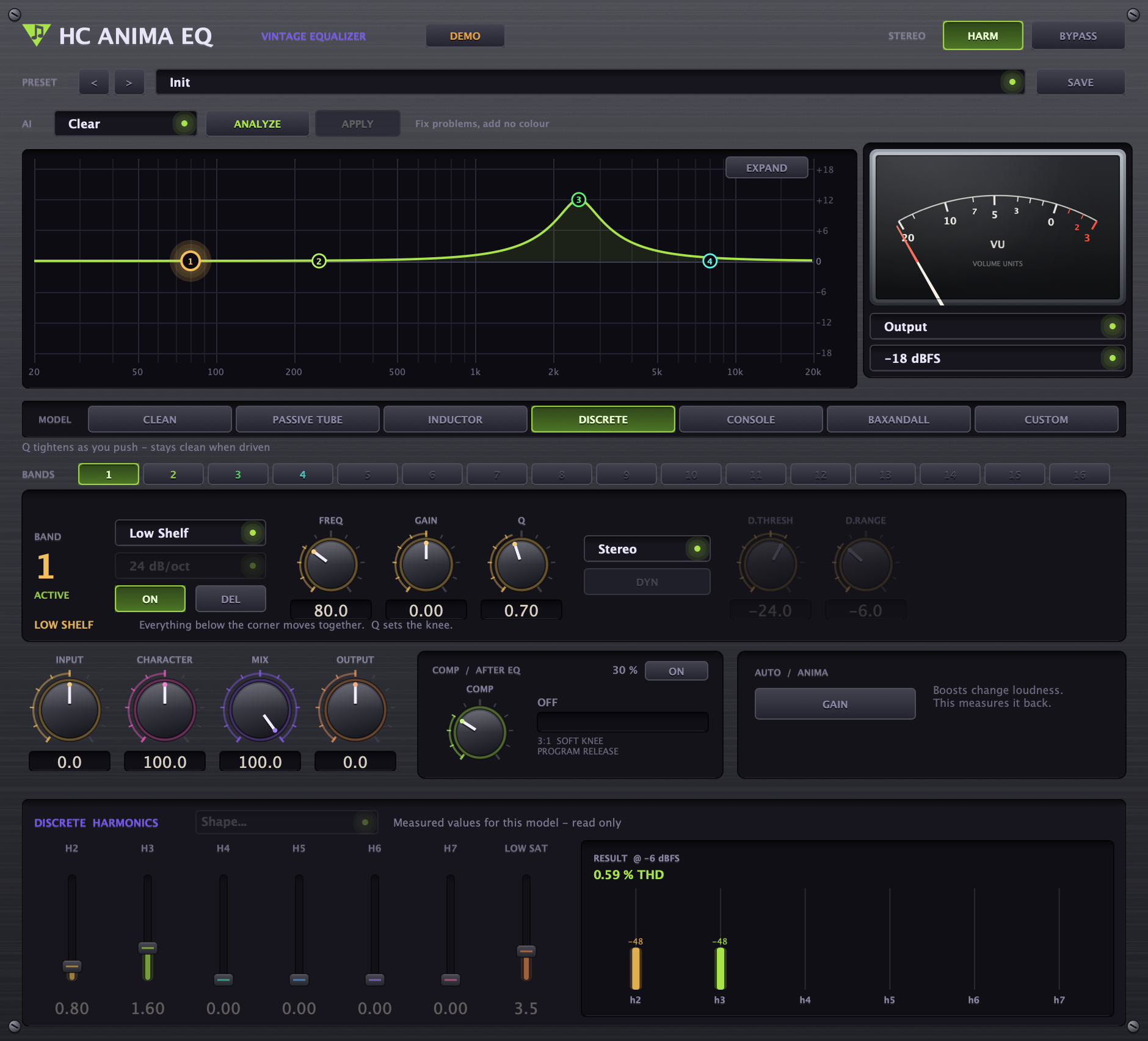
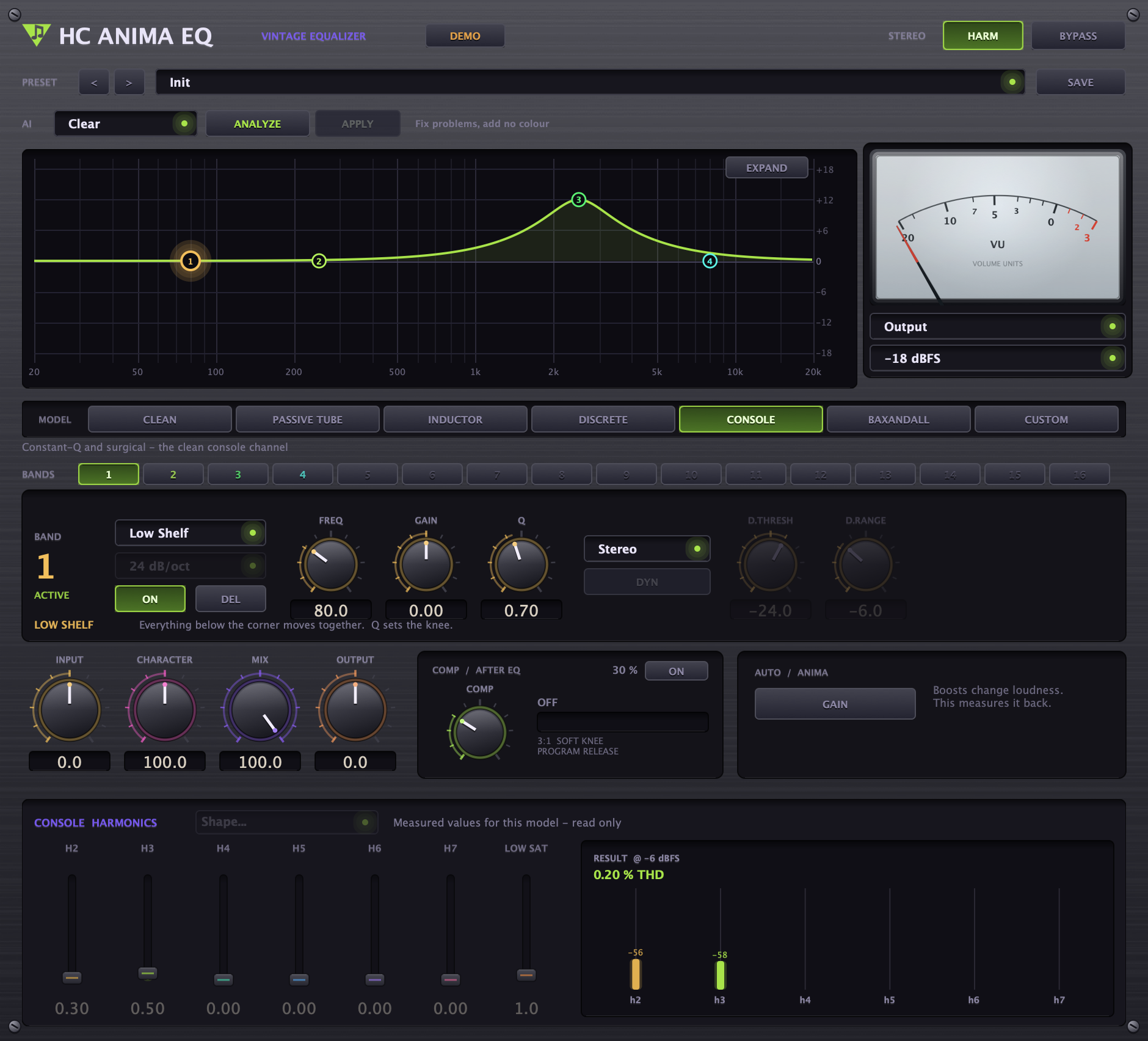
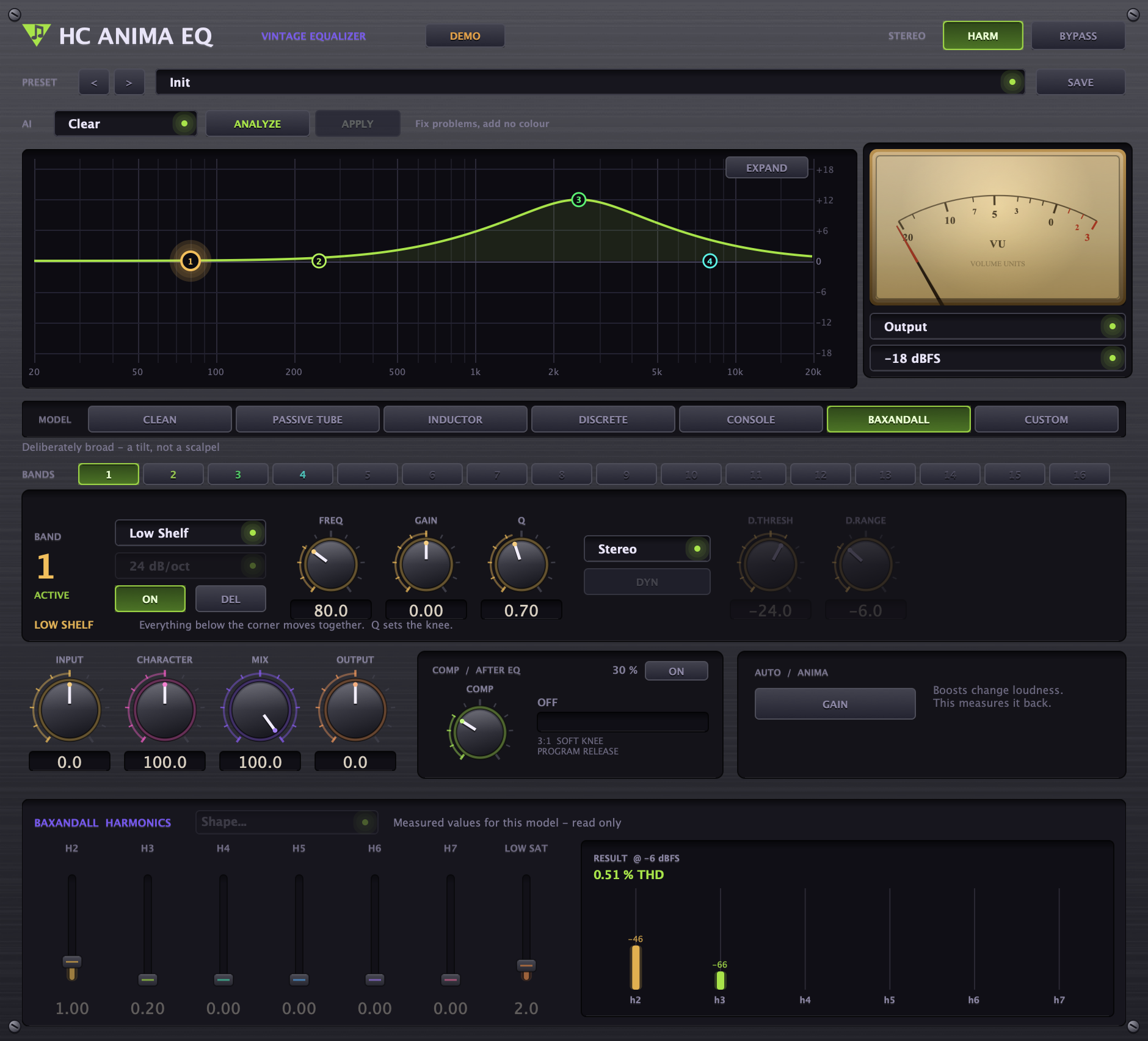
In all three shots the knob values are identical. You can choose by the curve alone.
The lows saturate first — thanks to transformers and inductors
Feed the same signal at 60 Hz and at 1 kHz and measure THD, and each model gets noticeably more colored in the lows only. That's because transformers and inductors in real hardware saturate first in the low end, and this product follows that ratio.
| Model | CLEAN | CONSOLE | BAXANDALL | DISCRETE | PASSIVE TUBE | INDUCTOR |
|---|---|---|---|---|---|---|
| 60 Hz ÷ 1 kHz | 1.00× | 1.19× | 1.29× | 1.96× | 2.62× | 2.72× |
Put INDUCTOR or PASSIVE TUBE on bass and kick and it «gets heavier» — these numbers are why you hear it.
How to use it — from install to your first mix
Read just this far and you can start using it right away.
Install — open it and just press «Continue»
After purchase, you can download HC-Anima-EQ.pkg from My Library. Double-click to open it, then Continue → Install and you're done. VST3 and AudioUnit each go to their own place automatically.
If it asks for your administrator password along the way, enter it — it installs into the folders shared by all users.
When the install finishes, quit and reopen your DAW for it to appear in the list. Look for "HC Anima EQ" in the plugin list.
Logic runs an AU validation the first time (tens of seconds).
The installer is notarized by Apple, so the "unidentified developer" warning does not appear.
Register your license — your key is in My Library
Once your payment is confirmed, your license key appears in My Library. No need to wait for an email — just sign in and check. Enter the email you purchased with and that key in the window that appears the first time you open the plugin.
If the key isn't there yet, your payment hasn't been confirmed yet or the key hasn't been issued. If it takes a long time, contact us at mixingart@naver.com.
Before you enter a key it runs as a demo — the sound fades out for 0.6 seconds every 40 seconds.
That's not a fault but a trial limit (done as a fade so there's no click). Otherwise every feature works exactly the same.
Keys are specific to each product — an HC Anima Comp key will not open it.
A key is tied to your email, and case, hyphens and line breaks are ignored when it's read. You can type it in by hand.
Drag right in the curve window
Drag the round handle in the large window and that band's frequency and gain move together. Q is the mouse wheel. Pick a band in the BANDS row below and that band's knobs open up underneath.
The faint lines layered above show each band's own contribution; the bold line is the combined result. You can use up to 16 bands, with four on by default. EXPAND enlarges just the curve window.
Pick a model — and compare by ear
The default is CLEAN. If the sound changed the moment you inserted it, you couldn't «compare», and without comparing you can't tell what the character is worth.
Set your curve with CLEAN, then press through CONSOLE → DISCRETE → BAXANDALL and listen. The shape of the curve window changes right in front of you — the measurement table above is that picture. The CHARACTER knob sets how much color you get.
If you can't decide, start like this — presence on vocals and guitars: DISCRETE, overall tone: BAXANDALL, carving out a problem band: INDUCTOR, exactly that spot only: CONSOLE.
AI — split into two tiers
Tier A · AUTO GAIN — boosting makes the sound louder. It measures that increase and gives it back. It's the only thing an EQ is allowed to do by itself, so it's the only thing included.
Tier B · ANALYZE → STYLE → APPLY — while the sound is playing, press ANALYZE and it listens for 3 seconds. Pick a style and press APPLY, and a curve is proposed. It's drawn on screen first, and if you don't like it, fix it on the spot.
The rules are not learned weights but measurement plus rules written as text. It's best to play it the loudest section — measure in the chorus and it fits the verse too, but not the other way around.
Build your own harmonics — CUSTOM
The six models use harmonics «written in a table». The seventh, CUSTOM, reads them from the knobs instead — press the HARM button at the top to open the edit drawer.
· H2 ~ H7 — how many % for each order, from 2nd to 7th
· LOW SAT — how much «more» the lows get colored (the ratio in the table above)
· On the right, the THD being produced right now and a bar for each order show in real time
Even orders (2, 4, 6) sound thick and odd orders (3, 5, 7) sound edgy. Start by raising just the 2nd a little.
An EQ's harmonics are driven by the total boost — the more you boost, the deeper the color gets. It's the role the amount of gain reduction plays in a compressor.
There's a compressor right after the EQ
One knob in the COMP / AFTER EQ section is all it takes. It presses down whatever the boost made stick out, right after the EQ — preset to a 3:1 soft knee with program release.
Serious compression is the job of HC Anima Comp. This one is for «cleaning up after a boost».
FAQ
Which DAWs does it work in?
It supports VST3 and AudioUnit — you can use it in most DAWs, including Logic, Cubase, Studio One, Reaper, Ableton Live and HUMANCODE. It works in both mono and stereo.
Does it work on Windows?
The installer you can download right now is for macOS. A Windows version is in preparation, and when it's out you'll get it with the same license — you won't need to buy again.
I bought HC Anima Comp. Does that key open this?
No. Each product has its own key system — if a compressor key opened the EQ, the reverse would have to work too, and then one key would be two products. When you buy the EQ, you get a key just for the EQ.
The «models» have different names from real hardware. Why?
That's on purpose — they are named by circuit type. Real hardware names are still living trademarks, and independently implementing a measured circuit behavior is a different matter from putting someone else's trademark on a product. Which hardware inspired which model is written so you can work it out from the character descriptions and the measured values.
Is it heavy on CPU?
The stage that produces the harmonics runs at 4× oversampling — to keep overtones from folding back in (aliasing). CLEAN, which uses no color, doesn't carry that load.
How do I get updates?
Download the new installer from My Library and install over the old one. Your license key keeps working as is. Update notes are written in the product's section of your library.
Can I get a refund?
Because it's a digital product, refunds are difficult once the license key has been sent. If you have trouble installing or registering, we'll help you all the way through — please contact us at mixingart@naver.com.
After we confirm your PayPal payment, your license key is issued automatically within minutes. Payments are confirmed manually, usually within one business day.
macOS only for now · signed and notarized installer (pkg) · VST3 · AU · lifetime use
After purchase you can download it again any time from My Library.