The books became an AI, and the AI became a DAW
Most "AI mastering" hands you a result and stops there. You can't tell what was done or why, so if you don't like it there is nothing to adjust. HUMANCODE analyzes again after applying processing to confirm it did what was intended, and shows you the whole process in a report.
Every process goes in as a named plugin on an insert. If there's one thing you don't like, just remove that one, and undo goes back as far as 60 steps. An AI you can reverse is the point.
✨AI on every channel, an AI Master on the master, 22 master-engineer styles, and the Mixia engineer who listens while you play and speaks up. The AI makes the judgments, and the final decision is yours.
"Not an AI that hangs plugins for you —
it's closer to having an engineer who knows mixing sitting beside you."
Beta pricing — the price goes up every month (today is the cheapest day). (The next generation, 2.0, is a separate new product.)
We confirm PayPal payments manually, usually within one business day. Once your payment is confirmed, your license key is issued automatically within minutes and your downloads appear in My Library.
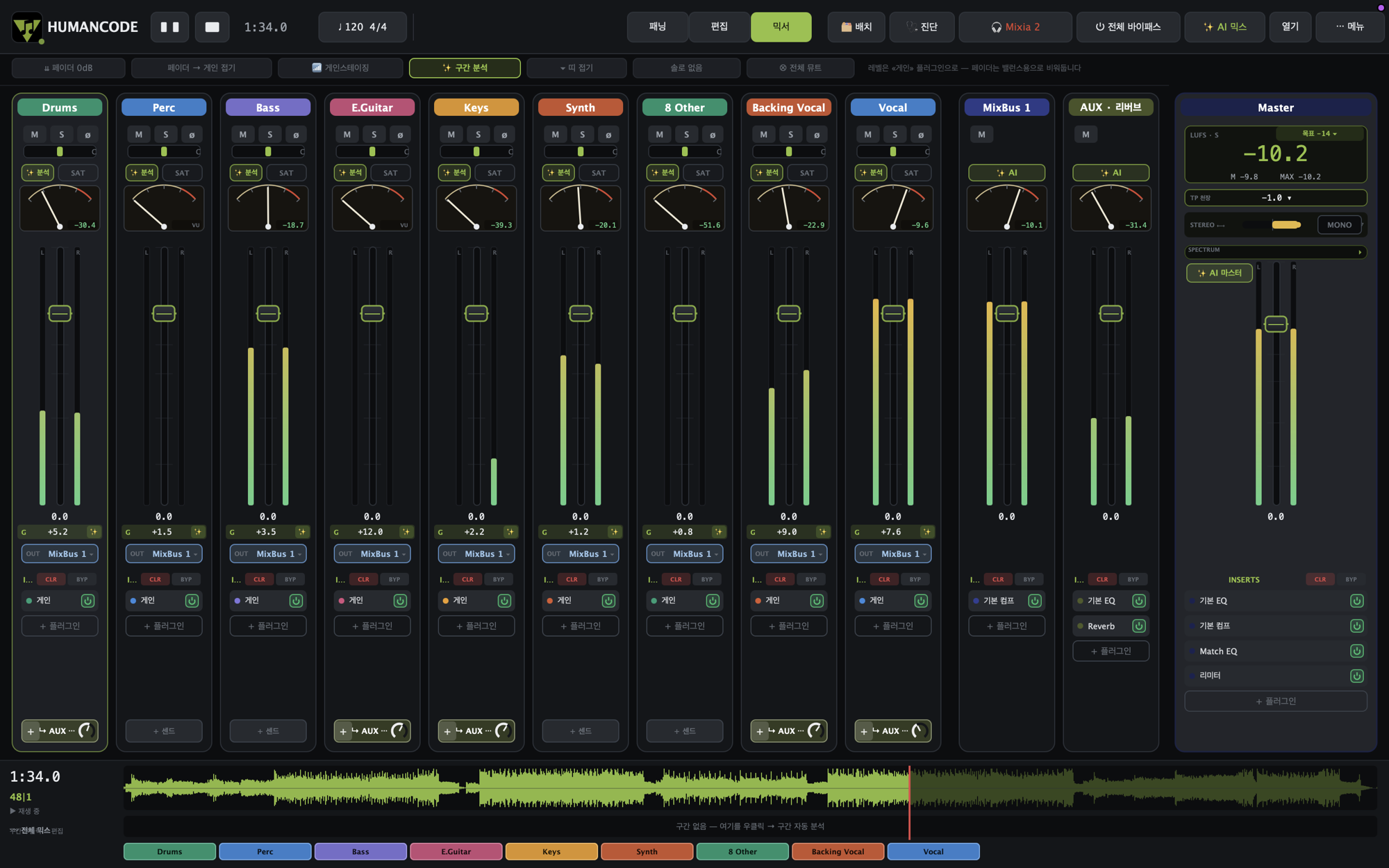
What you see on screen
Stuck? You get the answer on the spot
Press "Mixing tips for this instrument" on a track and it tells you how to handle that instrument right inside the app. If you want to know more, it continues into the e-book from that spot — you don't have to leave the window while you mix.
Gain staging is built into the design
Fader 0 dB and Fold fader into gain buttons are always visible at the top. Level goes with gain, and faders are for balance — the principle MixingArt keeps repeating in its books, as a single button.
Analysis and SAT on every channel
Every channel strip has Analysis and SAT buttons, so you can check and try things channel by channel.
An analog gauge on every channel
The needle meter at the top of each channel shows at a glance how hot each track is coming in.
22 master-engineer styles
It finds and loads the plugins actually used for that sound, and substitutes something of the same character if you don't have them. It also compares frequency balance against a master-engineer tone target across 6 bands and names the problem, such as mud 200–400 or boxiness 400–800.
An AI you can reverse
Everything the AI applies goes onto an insert as a named plugin. Remove just the one you dislike. The report (⌘R) records what was done and why, with the measured values.
Source track diagnosis
Before mixing it analyzes hum, noise, clipping, DC, clicks and phase. It points out problems per track in numbers, like "50 Hz hum +10.1 dB", and "Fix everything fixable" cleans them up in one press.
Playback prediction per platform
A table shows how many dB your song will actually play at on Spotify, Apple Music, YouTube, Tidal, Amazon, Deezer and broadcast (R128). Platforms where true peak goes over are flagged in red.
Master = AI Master + professional metering
Real-time LUFS (integrated, short-term, momentary), LRA, PLR, PSR and crest, and a true-peak ceiling setting, all inside the master. No separate meter plugin needed.
Mono compatibility in numbers
It shows phase correlation, low-frequency correlation, Side/Mid and mono-sum loss in real time, so you catch a mix that would fall apart in clubs or on broadcast before you make it.
Place panning by eye
Drag tracks onto a stage with left-right and front-back. You can load style panning layouts, and the phase meter below tells you immediately whether it's safe.
Immersive — all the way to front and back
Beyond left-right-only panning, you place sound in a circular space. Anything moved here is restored to its original state when you go back to normal panning.
The Mixia engineer beside you
Just play, and it listens and tells you in words, like "Loudness is off target by −3.3 dB". One press of the Match button even corrects it.
Keep using your plugins
Load your third-party plugins on inserts as they are. Basic EQ, compressor and limiter are built in too.
MixBus and AUX routing
Even MixBus and AUX (reverb) sends — you can build the real mix structure as it is.
English and Korean interface
Most of the screen — menus, the bounce window, AI Master, diagnostics and the plugin analyzer — is available in English, so it's comfortable to use from abroad. The full Korean UI is there too, from the menus to inserts, sends and global bypass.
Lyric transcription — on your own computer
Press 🎤 on a vocal track and it listens to the song and writes out the lyrics, placing them on a band under the track. Click a line to hear just that part, and double-click to edit. It picks the language by itself — Korean, English, Japanese …
Audio never leaves your computer, and there are no usage fees — you download a 465 MB model once, and after that it costs nothing no matter how many times you run it.
Simple mode when you first open it
Load a song and you're done in five steps. After that, you shape it with just five dials: Vocal, Backing, Brightness, Space and ✦Magic. You can switch to Guided or Pro mode any time, and your song stays as it was.
Mixing AI-generated songs (Suno and others)
Songs generated with Suno or Udio are handled knowing they are sources that already have reverb and compression on them. It measures the amount so processing doesn't pile on top, and takes some off.
MIX MAP — two layers, mix and master
On the right is the mix (balance, clarity, space); on the left is the master (tone, punch, dynamics). Set the mix first, then look at the master. AI solve and the AI Master on the mastering screen now give the same result.
Panning view — turn it with your hand
Grab the listener and drag left or right to spin the stage around, or drag up and down to look down or up at it. Only the view changes and the sound stays the same — the layout becomes clear at a glance.
Track link
Select several tracks and press ⌘L once, and volume, mute and solo move together. Volume moves by the difference, so the gaps you've set are kept.
Per-track AI tuning — watch-along mode
Right-click a track and choose "Chain AI tuning — watch along", and it shows you what it's touching and why, one step at a time. The earlier method that applies it right away is still there.
Windows: an installer
In addition to the unzip-and-run version, there is now an installer. A new version no longer adds another folder — it overwrites in the same place — and you also get Start menu and desktop icons.
…and Brick Breaker
A round for when your ears are tired. Every brick is the name of a DAW, and there are beginner, intermediate and advanced levels. Where it's hiding, you'll have to find out yourself.
From purchase to download
Sign up first (required)
Sign up at maebook.com before you pay. Access can only be granted to a registered account.
Pay with PayPal
Pay USD 79 with the PayPal button above, and enter the same email you signed up with in the payment note.
We confirm your payment
We confirm PayPal payments manually, usually within one business day.
License key issued
Once your payment is confirmed, your license key is issued automatically within minutes.
Download from My Library
Sign in at maebook.com, then go to My Library → 🎛 Program downloads. You can download again there any time.
What "beta" means
There are no feature limits. No locked features, no save limits. Everything you saw above, you can use all of it. "Beta" doesn't mean "you only get part of it"; it means it's still being polished.
It is a program in development, so unexpected errors may occur. If you report a problem you find, it goes into an update — feedback from engineers who actually use it is what completes this DAW.
Because it's early in development, you get the full license at a special price, and on top of that 1.x updates are free with no limit on the number. You receive the whole process of it being refined and gaining features, and you don't need to buy again when the official 1.0 comes out.
Both macOS and Windows are provided. After you buy once, you can choose [📥 macOS] or [📥 Windows] in My Library — the same license key is used. The Mac version is a signed and notarized DMG, and the Windows version is a code-signed installer, so they install straight away. If you use the new installer (recommended), it overwrites in the same place instead of adding folders.
For now it is a tool for mixing and mastering only. Use it to bring in tracks you recorded and arranged in another DAW and finish them. Recording and MIDI are not supported yet (planned). Please be sure to check this before you buy.
All features are documented in the user manual (currently Korean only). Reading it before you buy will tell you exactly what kind of tool this is. For questions, message us on mixingart@naver.com.
Update notes
If you've purchased, download the latest version again from My Library → 🎛 Program downloads. (1.x updates are free)
2026.7.30 — Clip editing · Stem export · Metronome · Track freeze · Color themes
· Automatic 5 ms fades at every cut seam — removes the "click"
· Fades and crossfades (overlap two clips and right-click) — fixes vocal comping seams
· Clip gain knob (±24 dB) + gain line (adjust over time inside the clip, and the waveform follows) — processed before the fader
· Copy, cut, paste (⌘C/X/V) · duplicate right after · snap and grid (off to 1/16)
📤 Stem export · 🥁 Metronome · ❄️ Track freeze
· Per-track and per-bus stems from Bounce (⌘B) — each stem comes out through the bus and master, so summing them gives the mix exactly
· Metronome k (not included in the master or bounce)
· Right-click a track name → ❄ Freeze (bakes the inserts) to free up CPU; fader, pan and sends stay as they are
🎨 Color themes · 🎵 ARA (Melodyne)
· 5 color themes — HUMANCODE, Midnight, Tape, Charcoal, Violet
· Melodyne pitch editing now works properly (4 fixes covering linking, display and the analysis algorithm), VST3 preferred, transport sync
· If you use Melodyne, please scan for VST3 once in the plugin scan
🎚 Workflow · 🐞 Bug fixes
· Shortcuts: s solo · m mute · b cut · z fit all · k metronome (s/m apply to all selected tracks)
· Click a track name for a vertical channel strip; pan bar + knob (⌥-click to center, double-click for a numeric value)
· Mono split save issue (it came back as stereo when reopened — songs from before need to be split and saved once more) · master LUFS collapse · clipped text on the English toolbar
FAQ
Is it the same as the free Mixia Scan on the site?
No, they are different. Mixia Scan on maebook.com is a free tool that diagnoses a finished mix when you drop it in. HUMANCODE DAW is a program for mixing a song yourself from scratch. If you only want a diagnosis, use Mixia Scan; if you want to do the mixing yourself, use the DAW. (Mixia Scan used to be called "HumanCode", but it got confused with the DAW, so we renamed it.)
Can I record or work with MIDI?
Not yet. Recording and MIDI are planned. For now it is a tool for focusing on mixing and mastering tracks you've recorded and arranged in another DAW. Please be sure to check this before you buy.
Can I use all my plugins? What about VST2?
It uses VST3 and AudioUnit (Mac). VST2 is not supported.
This is not a technical matter but a matter of rights. Steinberg, which created the VST2 standard, stopped issuing new VST2 licenses in 2018. Having the code is one thing; having the right to include it in a program you sell and distribute is another, so new hosts today are moving toward leaving VST2 out.
On Mac there is one more reason. Products that only came out as VST2 are mostly Intel-only, so they won't open in an Apple silicon app. It would mean including something that wouldn't open anyway.
In practice, most of your plugins will work as they are. Nearly every product sold today also ships VST3 or AU, so download and install the VST3 version from your vendor account. Waves, iZotope, Plugin Alliance and UAD all provide VST3.
If you really need an older product that only exists as VST2, you can process just that track in another DAW, export it as audio and bring it in. Tell us which product you need and we'll help you look for an alternative.
How many master-engineer styles are there? What are their names?
There are 22. However, real engineers' names are not used; the styles are labeled with music-style names — using real names would raise trademark and publicity-rights issues and could be mistaken for those engineers endorsing the product. Only the name label changed; the tone targets and plugin palettes that produce each sound are the same. If you're not sure, start with INGSPR.
Does the AI do the whole mix for me?
It does. AI Mix (⌘M) analyzes all tracks and applies EQ, compression and space, then measures again after applying to confirm it did what was intended, and corrects it. But it isn't a black box — every process goes in as a named plugin on an insert, so you can remove just the one you don't like, and the report (⌘R) records what was done and why, with measured values. It's an AI you can reverse.
Is the Mixia AI the same Mixia as on the site?
Yes. Mixia, trained on the knowledge of every e-book MixingArt has written, has been built into the DAW as it is. The standard you used to ask about on the site now looks at your mix directly, inside your work screen, and talks about it.
How long is the beta price available?
The price goes up every month. This is a beta price offered because development is at an early stage, and today is the cheapest day. However, if you buy at the beta price you keep the full license as it is, you receive everything through the official 1.0, and 1.x updates are free — even if the price goes up later, there's nothing more to pay.
If it's a beta, are features locked?
No. It's a full license with no feature limits at all. No save limits, no locked features. It's offered at a special price only because development is at an early stage; the program you receive works completely, as you saw on screen.
If you buy during the beta, you keep it through the official 1.0. 1.x updates are free, so there's no extra cost. The price goes up after the official release, but you won't need to buy again then. The next generation (2.0) is a new product and separate.
Do I pay extra for updates?
No. 1.x updates are free with no limit on the number — from the beta through the official 1.0 and on to 1.1, 1.2 and so on. You don't need to buy again at the official release.
2.0, the next generation, is a newly built product and will be priced separately.
Does it work on Windows?
Yes. The Windows x64 version is out. After you buy once you can download both macOS and Windows, and the same license key is used.
In My Library you can choose [📥 Windows installer] (recommended) or the [zip version]. The installer overwrites in the same place instead of adding folders when you get a new version, and also creates Start menu and desktop icons. For the zip version, unzip it first and then run HUMANCODE.exe — the Resources folder must stay right next to the exe (don't run it from inside the archive).
The installer is code-signed, so it installs straight away. Even so, because we are a new publisher, a "Windows protected your PC" window may appear for a while; if so, click [More info] → [Run anyway].
What are the system requirements?
macOS 11 or later (Intel and Apple silicon, universal) or Windows 10 or later, 64-bit (x64). 8 GB of RAM or more, 16 GB recommended. No graphics card is needed because the screen is drawn by the CPU. The app is under 50 MB after installation. See "System requirements" at the top of this page for details.
How can I pay? Do I need a PayPal account?
Pay with PayPal (USD 79). You can pay by card without a PayPal account. Sign up at maebook.com first, then enter the same email in the payment note. We confirm PayPal payments manually, usually within one business day. Once your payment is confirmed, your license key is issued automatically within minutes, and your license key and downloads appear in My Library.
How does the license work?
The license is attached to your maebook.com account and issued as a license key in My Library. One license is for one person, and one person can use it on up to 3 computers — for example a studio computer and a personal laptop. Where several people use it (studios, schools), each person needs their own license; multi-seat discounts are available — ask us on mixingart@naver.com. The same key is used for macOS and Windows.
What is the refund policy?
If you have not yet received the installer or a license key, you get a full refund within 7 days. Once you have received them, withdrawal of the purchase is restricted. There is currently no trial version you can try before buying, so please look carefully through the feature descriptions and screenshots before you decide.
If I buy once, can I keep downloading it?
Yes. The program is a permanent purchase, so you can download it again from My Library any time, regardless of the free e-book access period.
Is it included in a subscription (Core / All Access)?
No. HUMANCODE DAW is a program you buy separately from the e-book subscriptions.
I paid but my access hasn't appeared.
Because we confirm PayPal payments manually, it usually takes up to about one business day. If it still hasn't appeared, message us on mixingart@naver.com with the email you signed up with and the time of your payment, and we'll handle it right away.